

Nik Wishlist & Ajax Mini Cart — wishlist and ajax cart for WooCommerce
Shoppers rarely decide on the first visit. They look at a couple of products, get distracted and leave — and when they come back, they cannot remember what caught their eye. Nik Wishlist & Ajax Mini Cart closes that gap completely: the wishlist survives even for guests, the cart opens right on the page with no reloads, and e-mails, coupons and analytics keep closing sales while you get on with running the shop.
A wishlist that does not get lost
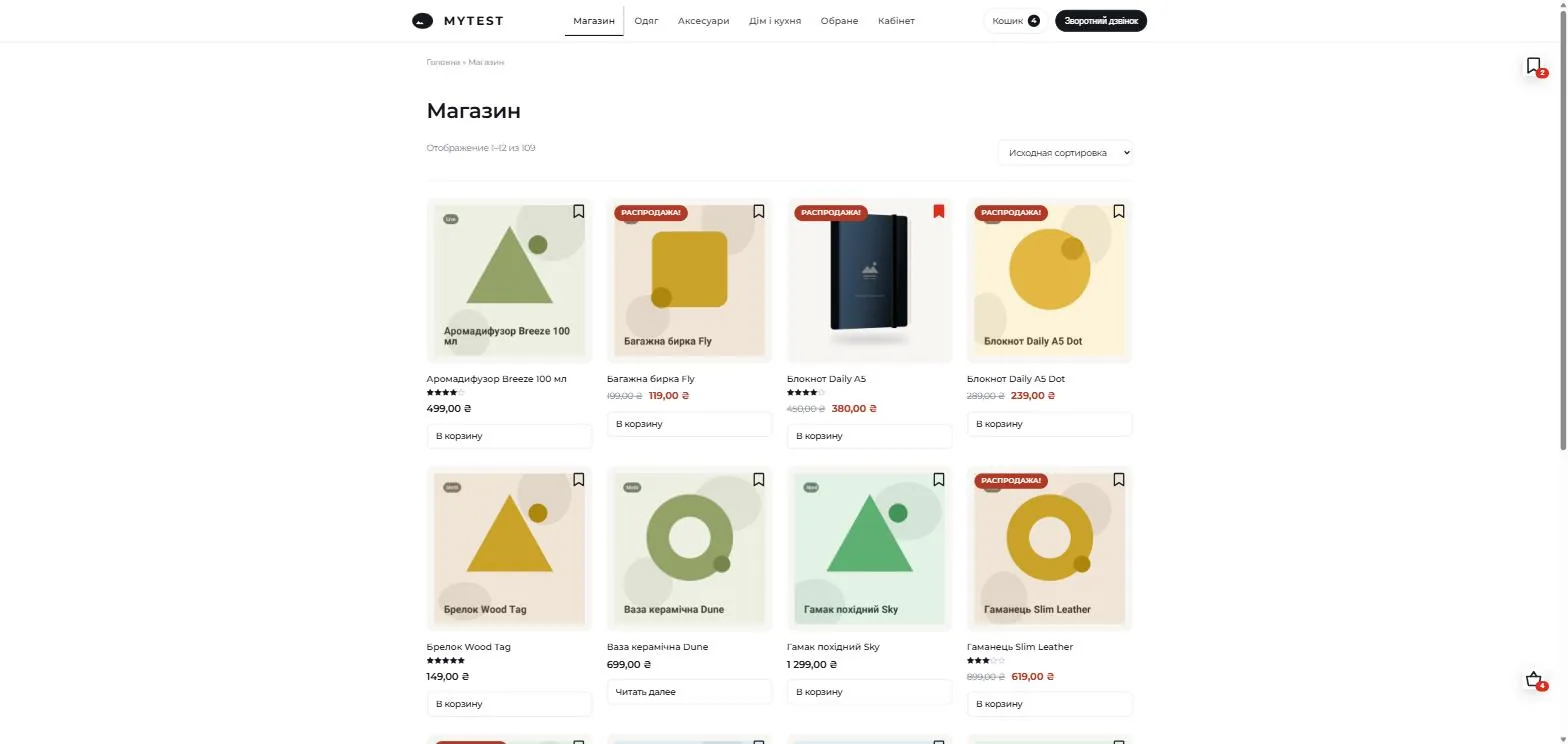
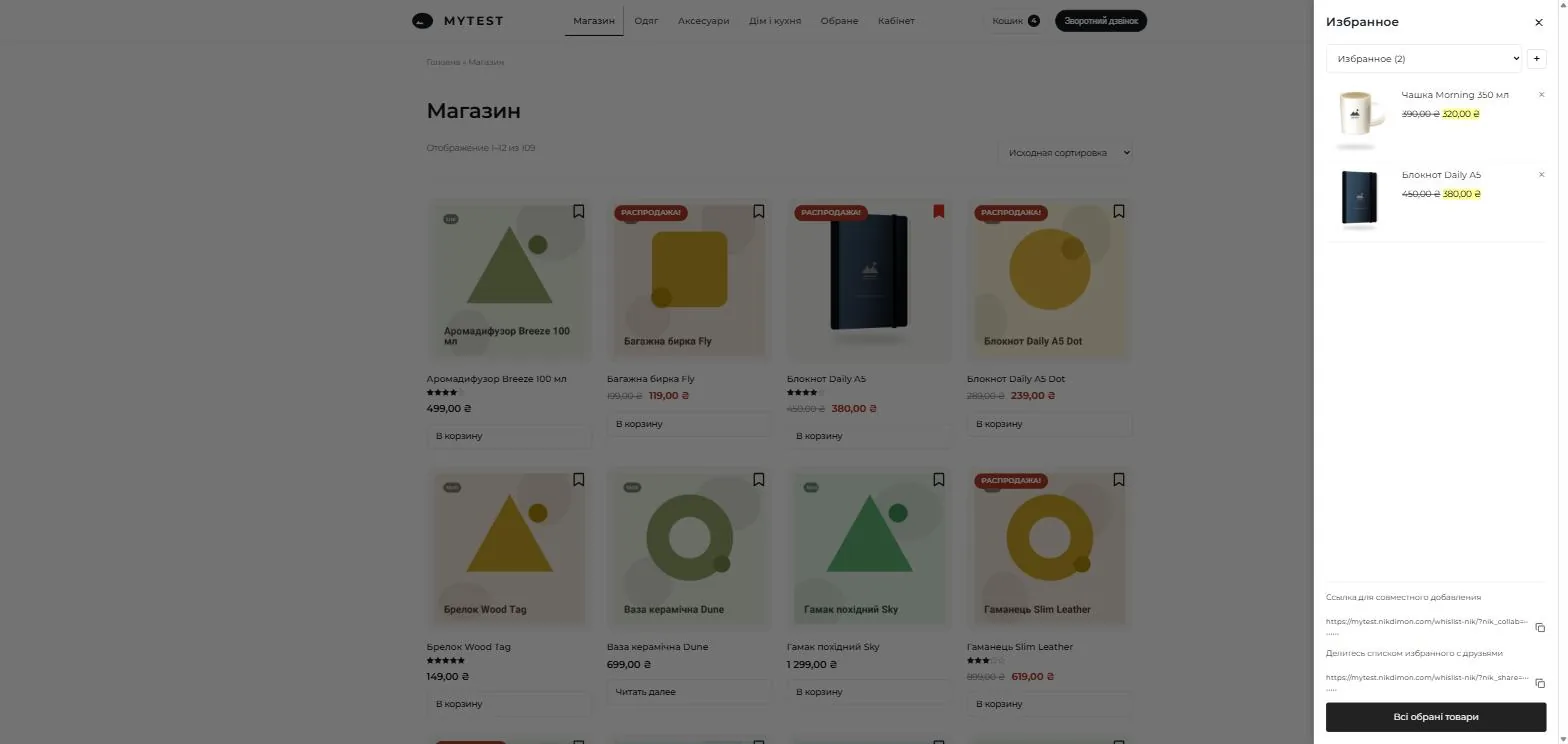
The button appears on catalog cards and on the product page — you choose the corner and the icon. Guests save products without registering: the list lives in a cookie, and the moment they log in it moves into their account automatically and follows them to any device.
- Multiple lists. Customers create “For me”, “Gifts”, “For spring” — as many as they need.
- A link to a list. Send it to friends and they can see the selection and copy items into their own list.
- A shared list. A separate link that lets several people add to the same list — the way a birthday basket or an office order gets put together.
- Your own icon. Heart, bookmark, star — or any image from the media library, in both the normal and the active state.
A mini cart without reloads
The panel slides in and opens by itself as soon as a product is added. Quantity changes with “+” and “−”, items are removed in place, totals recalculate instantly. Ajax add-to-cart also works on product pages, including variable products — the size and colour the customer picked arrive in the cart exactly as chosen.
The plugin can take over the cart completely, replacing the theme’s cart and the WooCommerce Mini-Cart block so the shop never shows two different carts. Block themes are supported: the panel reacts to the Store API button events.
Progress bars that lift the average order
Two bars inside the cart show how much is left until free shipping and until the discount. The goals are real: once the threshold is reached the discount is applied to the order as a proper WooCommerce discount — with correct tax and a correct figure in your reports — and free shipping unlocks automatically. One threshold for the whole shop. The goal used to unlock only WooCommerce’s own Free shipping method, so a shop delivering through Nova Poshta or Ukrposhta saw “Free shipping unlocked!” while the checkout still charged for delivery. Nik Shipping UA now follows the same threshold, and the decision is made from the very total the bar is drawn from — both switch at the same moment instead of on two numbers that merely happen to be configured alike.
Upsell at the moment of decision
Recommendations appear under the cart contents: cross-sells and upsells of your own products, or related products. One click adds them without closing the panel.

Automations that bring customers back
Abandoned carts
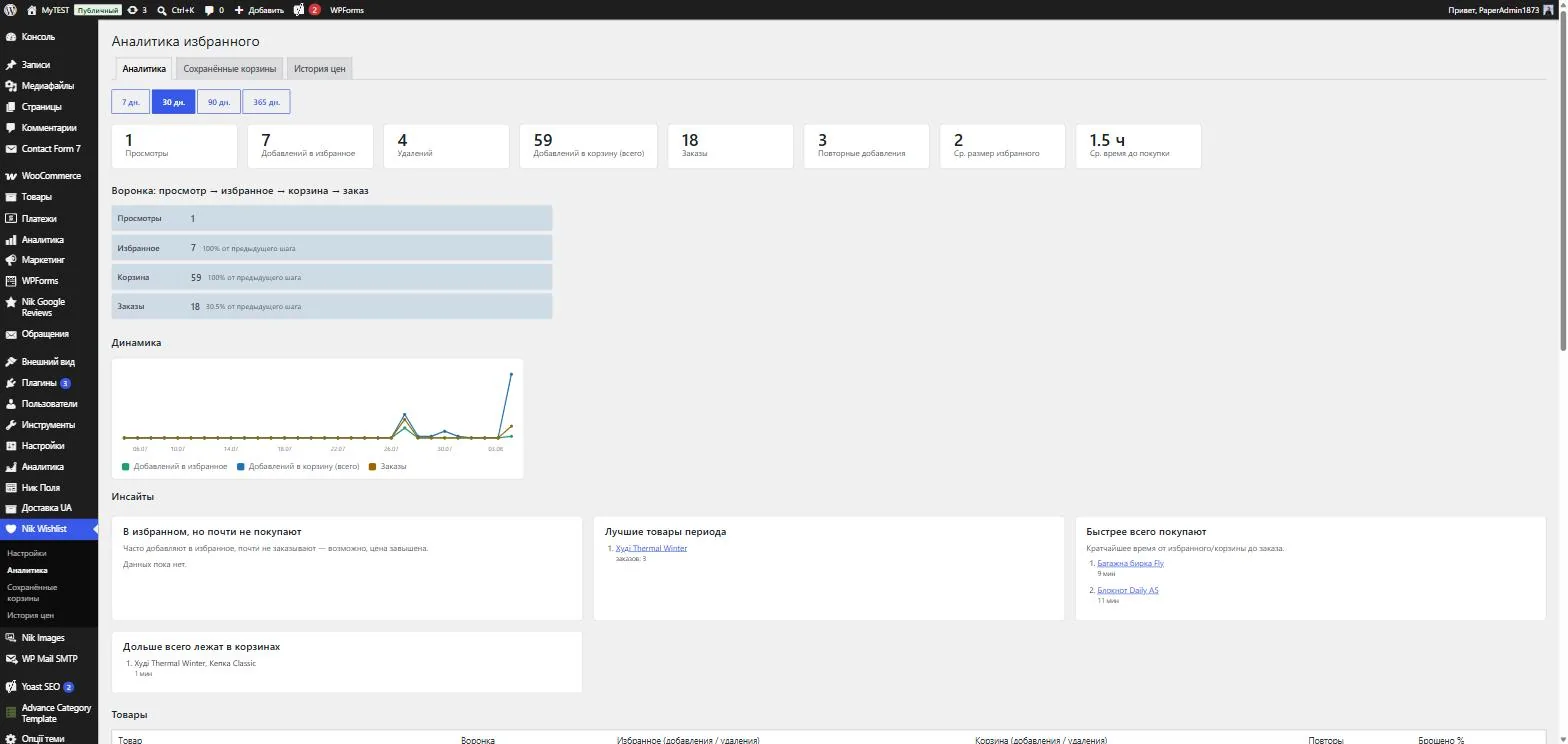
Every logged-in customer’s cart is saved. If the order is not placed, after a delay you set an e-mail goes out with the cart contents and a “Return to cart” button that restores the cart in one click. The Auto reminders screen shows everything: when the next check runs, when the last one ran and how many e-mails it sent, how many carts are due right now and how many are still waiting for the timer. There is a “Run the check now” button and a manual send for any individual cart.
An e-mail designer with a live preview
Every plugin e-mail follows one branding: logo, shop name, accent, button, background and card colours, corner radius, intro text, signature and your own footer links. On the right is a preview rendered with your real shop data, and a “send a test to myself” button next to it. Not a line of code.
Coupons for sleeping customers
Someone who saved products or filled a cart but never bought gets a personal coupon after a number of days you choose — you set the percentage and how long it stays valid. The coupon is tied to their e-mail address and works once. The e-mail has a single button: restore my cart with the discount already applied.
Price watch
The plugin records the prices of wishlisted products every day. As soon as a price drops further than your threshold, the owner of that list gets an e-mail. Price history and a log of everything sent live on their own screen.
Analytics, not just counters
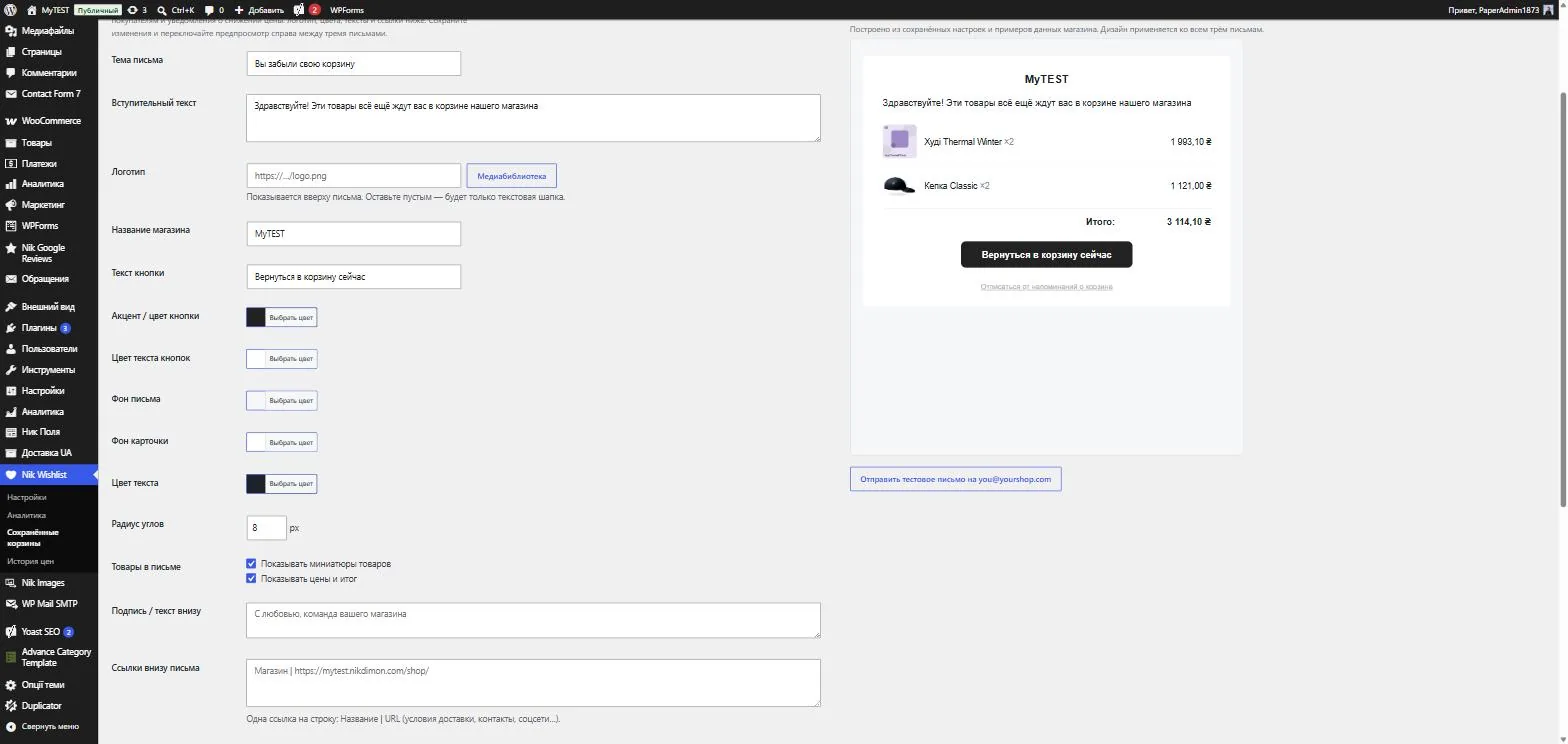
A funnel from view to wishlist to cart to order, with the conversion at every step. Per product: views, adds and removes, trend sparklines, share of abandoned carts. Plus the things you would normally work out by hand:
- repeat additions — the customer put a product back after removing it, a strong signal of intent;
- average time from wishlist to purchase, and average list size;
- popular categories by what people actually do, not by page views;
- insights: “wishlisted but rarely bought” (usually a price problem), best sellers of the period, fastest to purchase, longest sitting in carts.
Views are counted on the visitor’s side, so page caching does not distort the numbers. Your own admin activity is excluded.
Integrations and exports
- Telegram. New orders land in your managers’ group: items, total, name, phone, e-mail.
- Webhook. Order events are POSTed as JSON to Zapier, Make, SendPulse, KeyCRM — anywhere — with a secret so the receiver can verify the source.
- CSV. Export wishlists and saved carts for campaigns and range analysis.
The details you notice in daily use
- Plays nicely with page caching: state is fetched separately, so cached pages still show the right hearts and counters.
- Compatible with HPOS and block themes.
- English, Russian and Ukrainian included; storefront texts are editable in the settings, and multilingual sites are covered by WPML and Polylang.
- Colours, radii, floating icon offsets and custom CSS — without touching template files.
- GDPR: personal-data export and erase through the standard WordPress tools, consent for the analytics cookie via the WP Consent API, and ready-made privacy policy wording.
- Clean uninstall: one checkbox and the plugin takes every table, option and scheduled task with it.
- Accessibility: the wishlist and cart panels are proper dialogs. Focus moves in when they open and returns to the button when they close, Tab stays inside instead of wandering the page behind, and a closed panel is out of the keyboard tab order. Visible focus rings, right-to-left styles and the “reduce motion” system setting are all supported.
- Share, collaborative, unsubscribe and cart-restore links are signed with 80 bits. Links already sent to customers keep working.
Price
Free. There is no licence key and no subscription — every feature above, including the analytics, saved carts and abandoned-cart e-mails, is available the moment the plugin is activated. Download the archive here, upload it under Plugins → Add New → Upload Plugin, and activate. For updates, grab the latest archive from this page and upload it over the old version — all your settings and data stay in place.
Reviews
No reviews yet — be the first to share your experience.
Reviews can be left by users who have downloaded or purchased this plugin — that is why every review here is genuine.