
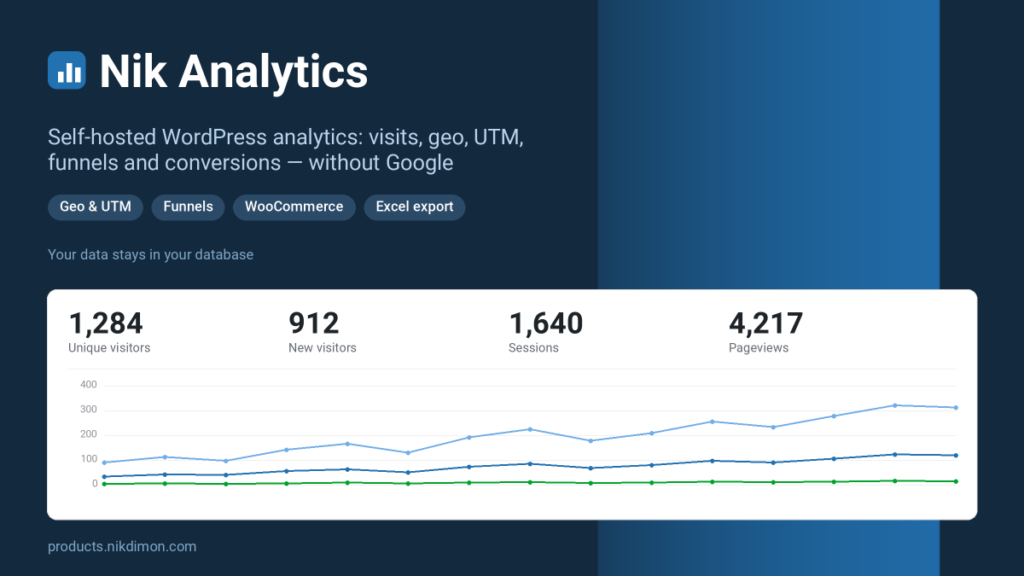
Nik Analytics Pro website and sales analytics
Nik Analytics shows what actually happens on your site — visits, geography, traffic sources, funnels and conversions — and keeps every number in your own database. No third-party trackers, no Google account: your statistics never leave your server.
It installs like any WordPress plugin: activate it, enter your licence key, and it starts counting straight away. An «Analytics» item appears in the admin menu — there is no tracking code to paste anywhere.
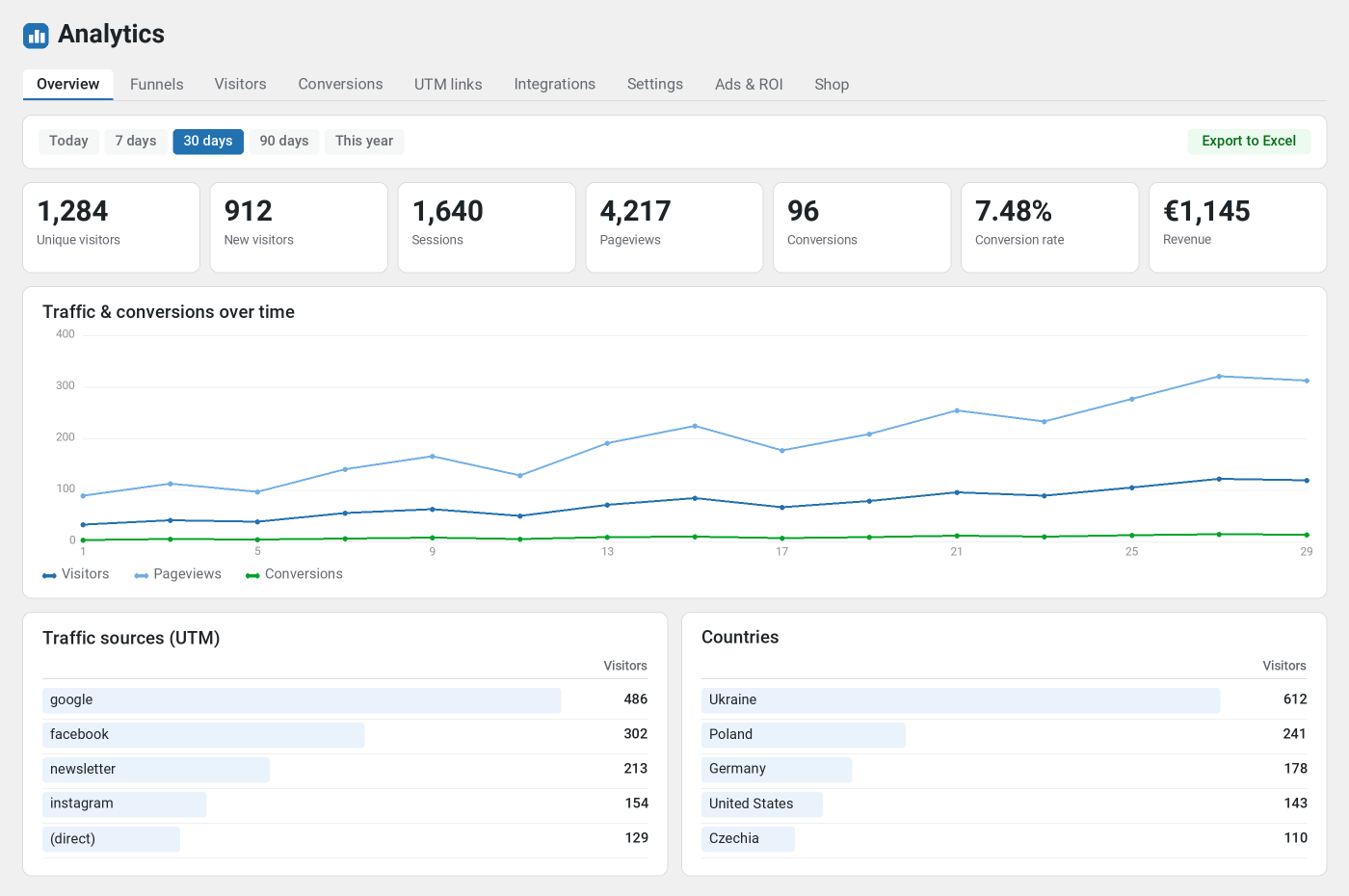
Money, advertising and your shop
Counting visits is something any tracker does. Nik Analytics answers «how much money did that make» — and it does so without you lifting a finger.
WooCommerce sales and revenue
An order is counted at whichever stage matters to you: placed, pending payment, on hold, paid, processing, completed, cancelled, refunded, failed. The amount comes from the real order total and lands straight in the funnel — so you see which campaign brought money, not just clicks.
Unpaid orders count too. Cash on delivery, bank transfer, invoice — the order appears in your reports the moment it is placed, not only when the money arrives. For many shops that is half of turnover, and ordinary counters simply never see it.
Payment gateway conversions
Successful payments from any external gateway: a server-to-server webhook (IPN) with its own secret, or matching the return URL the customer lands on after paying. Works without WooCommerce too — for a site with a single pay button, for instance.
Ad spend, ROAS and CPA
Conversions alone say «17 sales». With the campaign budget entered, the same row shows spend, revenue, profit, ROAS and cost per acquisition — the numbers a marketer actually manages by.
A dedicated tab puts the ad budget next to the result: spend, revenue, profit, ROAS and CPA for the period at the top, and the return on every source — channel — campaign combination below. Costs are entered by date or imported in bulk from CSV, and matched to traffic by UTM tags. Campaigns that burned budget and produced nothing show up too — those are the ones to switch off.
Conversions sent back to the ad platforms
Browser pixels lose conversions to ad blockers and cookie limits. Every conversion is already stored server-side together with the click id it arrived on, so the same events are reported back:
- Meta (Facebook and Instagram) — through the Conversions API, queued and sent by cron, with identifiers hashed as the platform requires.
- Google Ads — offline conversions exported to CSV keyed on
gclid, ready to upload.
Shop funnel
Four steps towards a purchase — viewed a product, opened the cart, started checkout, bought — with the share and the percentage lost at every step. Next to it, the best sellers by quantity and revenue, plus the coupons that were used. The steps are reconstructed from data already collected, so there is no extra code to install.
Scheduled e-mail reports
A cron decides whether today is a sending day and mails a short summary with the full .xlsx workbook attached — daily, every Monday or once a month. The client gets a report without ever opening the admin.
Agency mode
- White label — your own name instead of «Nik Analytics», and your logo on the e-mail reports.
- Analytics viewer role — a read-only login: the client sees the reports but cannot change settings, edit rules or delete data.
- Multisite — one screen covering every site in the network.
Unlimited history
You choose how long raw data is kept — forever, if you like. A full history is what lets you compare year over year instead of just the last few months.
Priority support
Straight from the developer, including help setting up funnels and conversion rules for your particular case.
Reports and analytics
What the reports show
- Traffic. Unique visitors, new versus returning, sessions and pageviews.
- Geography. Country, region and city for every visit.
- Devices. Device type, browser, operating system and language.
- Sources. Channels (direct, organic search, social, referral, paid, e-mail), referring sites and all five UTM parameters.
- Engagement. Bounce rate, pages per session and average time on site.
- Period comparison. Every number with an arrow: how it compares to the previous period and to the same period a year ago.
- Any period. Today, yesterday, 7 / 30 / 90 days, this month, this year, all time or a custom date range.
- Filters. Clicking a source, country, channel or device filters the whole report, so you can drill into the data.
- Search and errors. What people search for on your site, and which pages return a 404.
Funnels: see who really brought the customer
Ordinary counters credit the last click. Nik Analytics records both touches at once: where someone first arrived from, and where they came back from just before converting. If they arrived from an ad, returned a week later directly and bought, you see both versions and decide yourself which one earns the sale. A dedicated block compares the two models side by side.
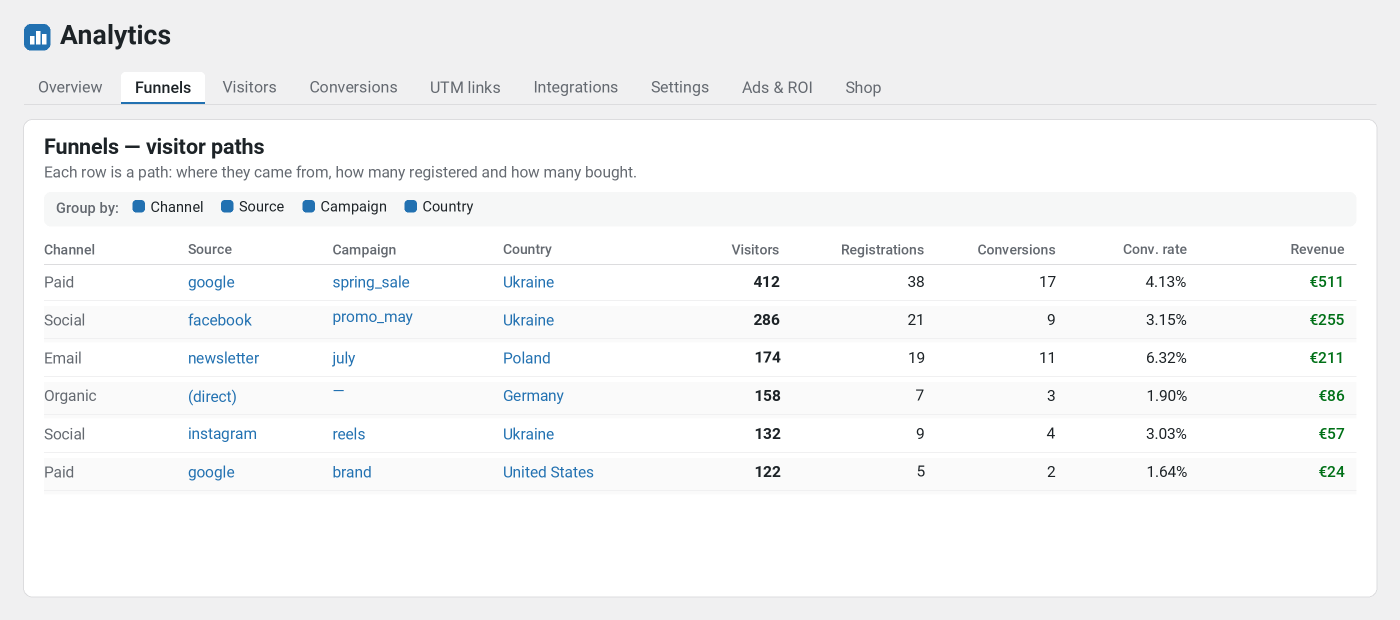
A single row answers the whole question: «412 visitors came from google on the spring_sale campaign from Ukraine, 38 of them registered, 17 bought». Group by channel, source, medium, campaign, country, device and landing page — in any combination. A funnel can be built around any conversion rule you have, including ones you create later.
Conversions you switch on with a button, no developer needed
The same logic as goals in an ad platform, set up in a couple of clicks right in the admin.
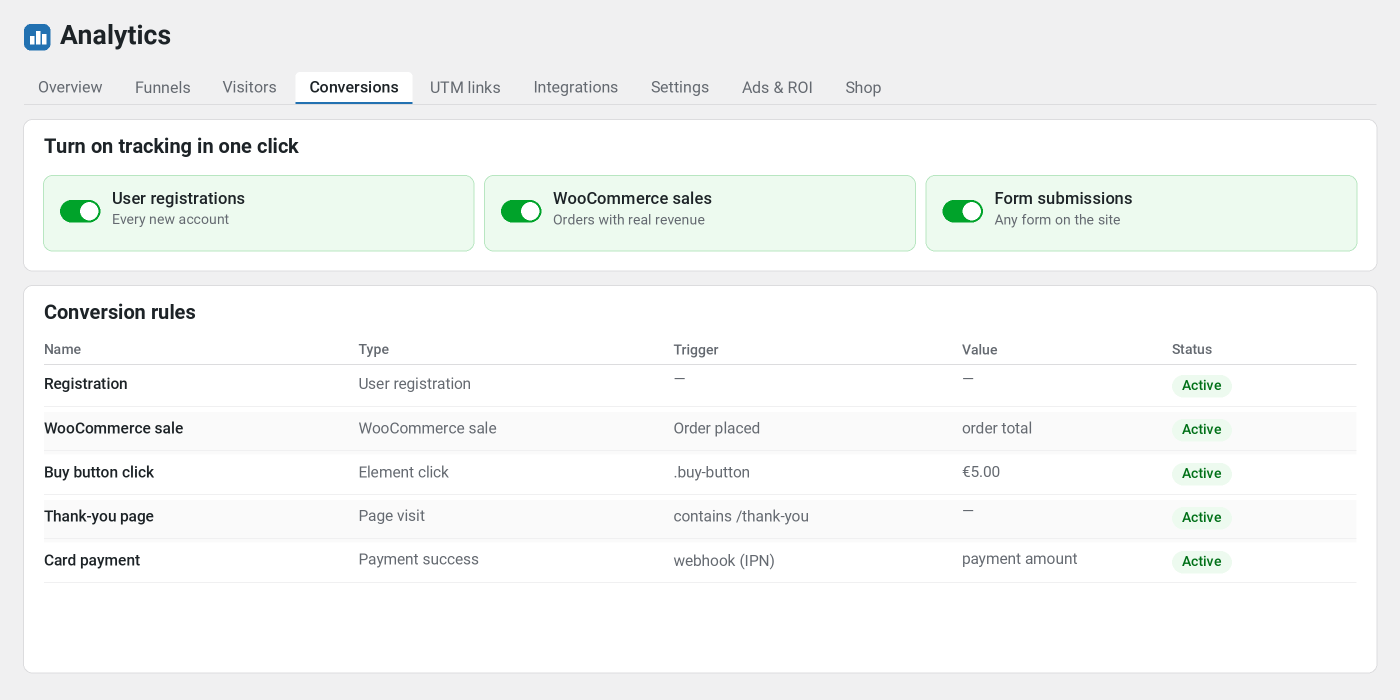
- Registrations — any new account, on plain WordPress or in WooCommerce.
- Form submissions — any form on the site, or only those matching a CSS selector.
- Element clicks — for example on
.buy-buttonor#call-now. - Page visits — a thank-you page, a download page and so on.
- Custom JavaScript events —
nikAnalytics.track('my_event')for anything unusual.
Every rule has its own value and currency, plus a counting mode: every time, once per session, or once per visitor — so repeated clicks never inflate the numbers.
Visitors: every visit by name
A separate tab lists everyone who came to the site. For each person you see where they came from (channel, source and campaign), country, device and browser, the entry and exit pages, pageviews, the time actually spent and the conversions they made. Clicking a row expands the full path through the site, step by step, split by session.
UTM tags and the link builder
A dedicated tab explains what each tag means and assembles the link for you: pick one of your pages, choose values from the suggestions or type your own, and see the result immediately. Save the link and simply copy it later for an ad or a newsletter.
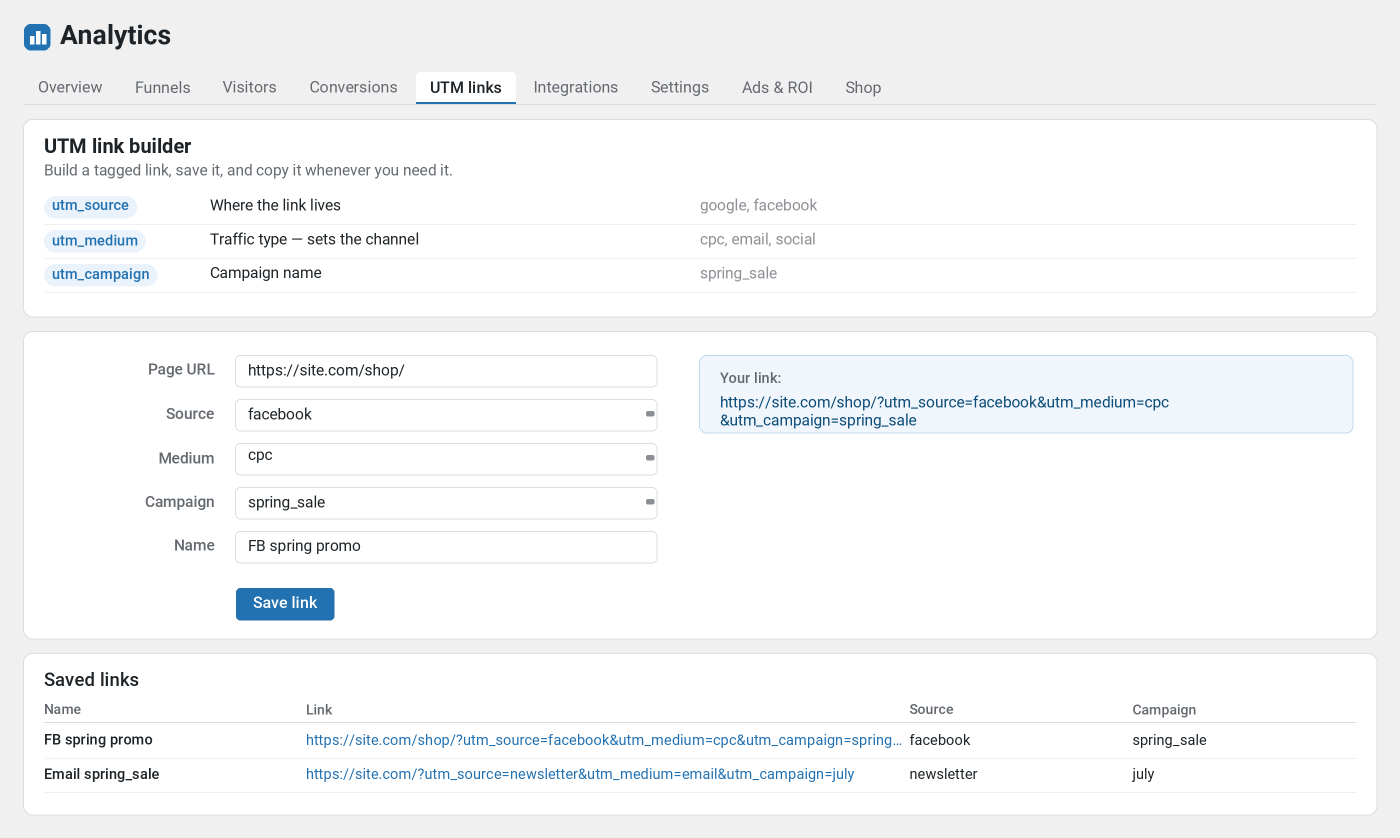
Alongside the tags the plugin remembers click ids — gclid, wbraid, gbraid, fbclid, msclkid, ttclid and others. Those are exactly what lets a conversion be reported back to the ad platform later.
Marketing tags without touching code
The plugin is not only for the analyst — it also helps the marketer who needs to connect an external service without editing the theme. On a dedicated «Integrations» tab, paste the snippet a service gives you — Google Tag Manager, Google Analytics, Yandex Metrica, a live-chat widget, an advertising pixel or a site-verification meta tag — and the plugin drops it into the right place on the page: in the <head>, right after the opening <body>, or before the closing </body>. The code goes in exactly as the service provided it.
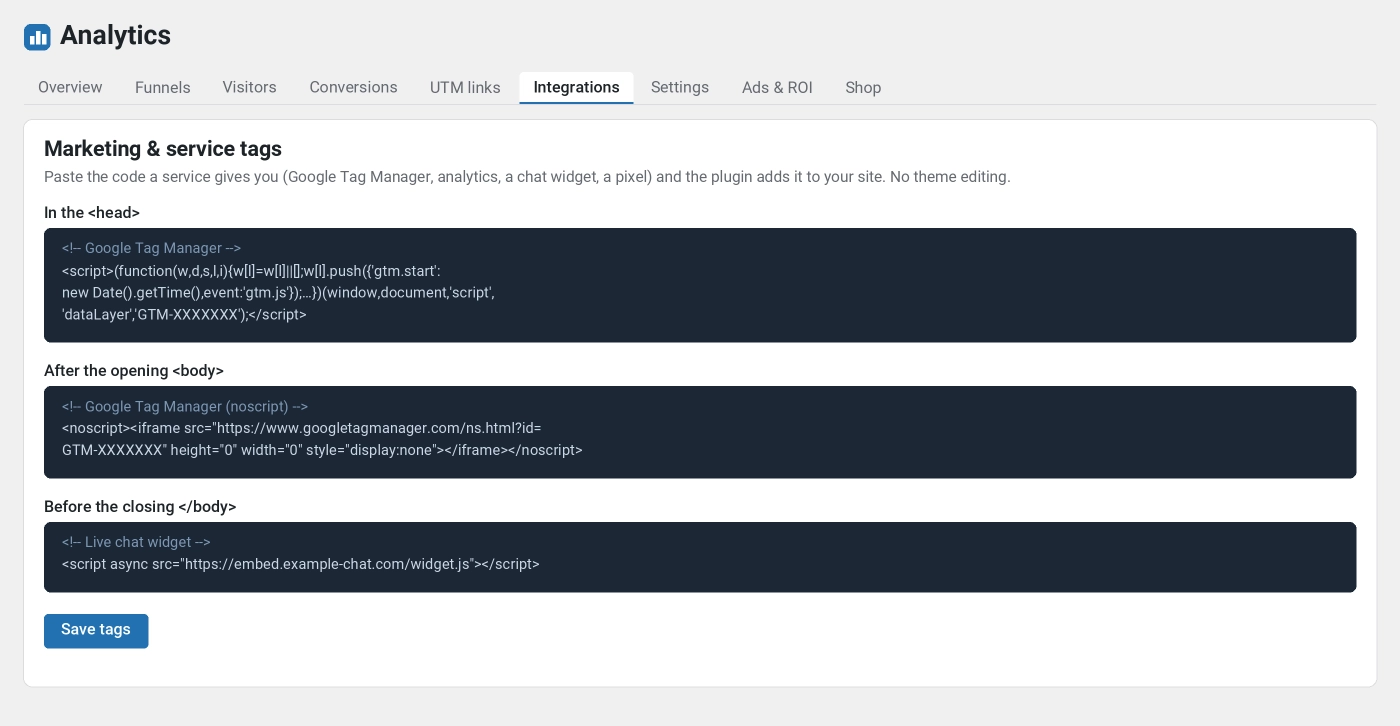
So a single plugin covers both the analytics and the external tags. Only a user with the right permissions can save raw HTML, so access to the code stays under control.
Excel export
Any report exports with one click to a real .xlsx file — not CSV. The Overview workbook arrives with several sheets: summary, day-by-day trend, sources, campaigns, channels, countries, pages, referrers, devices and browsers. Funnels and the conversion list export separately. The data is always yours and exports in full.
Privacy and speed
- The IP address is never stored — only an irreversible salted hash, and the last octet is dropped before hashing.
- The browser «Do Not Track» signal is respected, administrators and any roles can be excluded, and there is a bot filter.
- Cookie consent banners are respected: if the visitor has not consented to analytics, the tracker never starts.
- Your statistics go nowhere — they stay in your own database. The single outbound call is geolocation: if your CDN supplies a country header it is used, otherwise the IP is sent to the free ip-api.com service and the result is cached. Geolocation can be switched off entirely in Settings.
- Retention is a setting; older records are pruned automatically.
- The tracker fires asynchronously after the page has rendered, so it does not slow the site down and works correctly with caching plugins.
Requirements
WordPress 6.0+, PHP 7.4+. WooCommerce is optional — it is only needed for the sales module. The interface is translated into English, Ukrainian and Russian.
Installation and licence
- Buy a subscription here and download the archive in your account.
- If the plugin is already installed, just upload the new archive over it — your data stays in place.
- Upload the archive in Plugins → Add New → Upload Plugin and activate it.
- Open Analytics → Settings and enter the licence key from your account.
Updates arrive in the WordPress admin like any other plugin. The licence covers your domain and all of its subdomains. The plugin runs while the licence is confirmed: with no active key it collects nothing and shows only the activation screen.
Questions about the plugin
What does the subscription include?
The whole plugin: analytics, funnels, visitors, conversions, the Excel export, marketing tags, sales and payments, ad spend with ROAS and CPA, conversions sent back to Meta and Google Ads, the shop funnel, automatic reports and the agency features. Plus updates and support for the whole subscription period.
Do I still need Google Analytics?
No. Nik Analytics is self-contained and counts everything itself. If you already run GA, the two do not interfere.
Will it slow my site down?
No. Data is sent in a small asynchronous request after the page has rendered, so load time is unaffected.
Does it work with caching plugins?
Yes. The tracker runs in the browser, so visits are counted even on pages served from cache.
Is it privacy-compliant?
The plugin stores no IP addresses and sets no advertising cookies, honours «Do Not Track», and supports anonymisation and consent banners. Your statistics stay on your own server.
What happens to the data if I delete the plugin?
It is kept. Statistics are only erased if you explicitly enable that option in Settings — which is why reinstalling and updating lose nothing.
Are orders without online payment counted?
Yes. For cash on delivery, bank transfer or invoice the order is counted the moment it is placed — just choose that stage in the rule.
Reviews ★★★★★ 5.0 out of 5
-
★★★★★ ✓ verified user 24.07.2026
Отлично. доволен. четко можно отследить все пути клиентов и больше делать упор только на каналах которые приводят реальных клиентов. Юзаем в общем, надеюсь поможет в оптимизации.
-
★★★★★ ✓ verified user 22.07.2026
Thank you, I'm very pleased. Now I can clearly see the most effective traffic channels and links. This approach really saves money on advertising, especially if you buy publications on websites or from bloggers.
Reviews can be left by users who have downloaded or purchased this plugin — that is why every review here is genuine.