
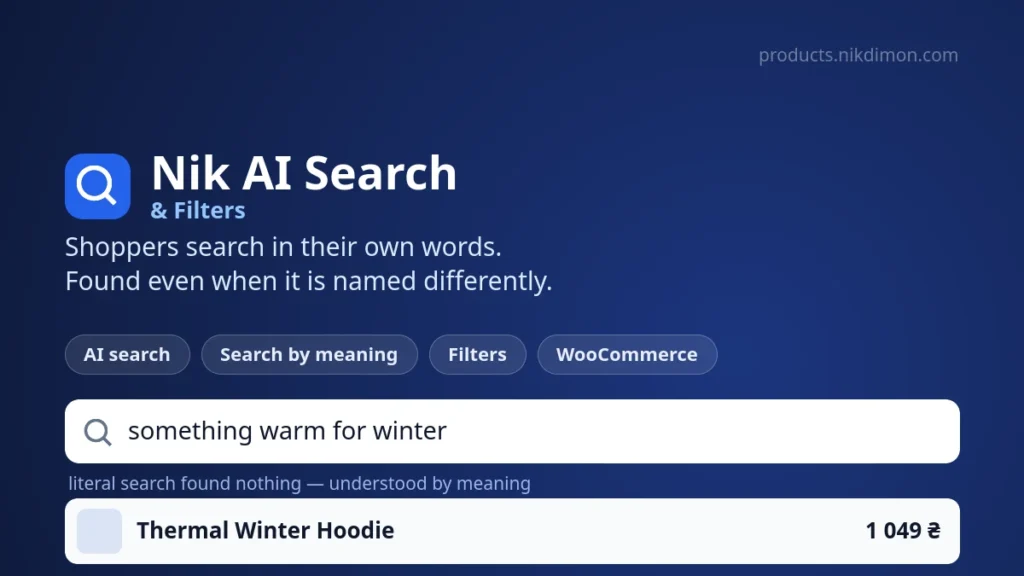
Nik AI Search & Filters — AJAX product filters and catalogue search for WooCommerce
Shoppers search in their own words: “warm hat under 500”, “something as a gift for mum”, “what to take hiking”. A literal keyword search finds none of that, and the shopper leaves — while the product sits in your catalogue. Every one of those empty result pages is someone who was ready to buy and could not. The plugin reports how many of them you have right now.
Nik AI Search & Filters closes that gap in four stages, and the shopper sees none of them — they just get products. Plus fast AJAX filters by category, attribute, price, stock, sale and rating, without a page reload.
Working AI from the first minute
A starter pack of AI search comes with the licence — about 2,000 AI searches, granted once when you subscribe. There is no OpenAI account to open, no API key of your own to paste, nothing further to buy: enter the licence key, and the shop is already answering “something warm for winter” on the same day.
That number goes much further than it sounds. Only the phrases the earlier stages cannot answer ever reach the model at all, and the dictionary keeps shrinking that share as it learns — for a small shop the starter pack is usually plenty. When it does run out, packs from €5 top it up in two clicks.
Four stages instead of an “ask AI” button
There is no AI button, and there should not be — the shopper simply types. The query then moves through the stages, cheapest first, and stops at whichever one answers.
- Literal search. Over its own index — title, SKU, attributes, description. Instant and free. It understands word forms: “hats” finds “Hat”.
- Dictionary. A phrase that has been worked out before is answered from memory — no model call, nothing deducted.
- Search by meaning. Every product is read once and stored as a set of coordinates, so “mug for tea” finds “Morning Cup”, and “something warm for winter” finds a fleece hoodie, even with no word in common. It works across languages too: a Russian query finds a Ukrainian catalogue. Costs no tokens.
- The model. Called last, and only for phrases nothing else could handle.
So only a minority of searches ever reach the paid stage, and fewer as time goes on: the dictionary fills up, and yesterday’s unusual phrasing is answered for nothing today. Your own report shows exactly how many.
An AI that cannot invent a product
The model does not reply in free text. It fills in a schema built from your own catalogue, where the list of categories and attributes is an enumeration of permitted values. It physically cannot name a category you do not have — that is a constraint on the answer itself, not a check applied afterwards.
When the shop genuinely does not sell what was asked for — a tyre in a clothing shop — the shopper gets a short, human reply saying so, and a pointer to what you do sell. That beats an empty page: an empty page reads as “the search is broken”, an honest answer reads as “not here, but look at this”.
The reply comes back in the shopper’s language, not the catalogue’s: a Russian query gets a Russian answer even when the products are written in Ukrainian.
A dictionary that learns only from confirmed answers
The first shopper to use a new phrasing costs one model call. The phrase then enters the dictionary — not as an answer, but as a proposal.
It becomes an answer only once a shopper actually opens one of the products it produced. A click is the only evidence available that the reading was right, and it costs nobody anything to give. An answer no one took stays a proposal and is never served again: one poor guess costs one model call instead of becoming the shop’s permanent answer to that phrase.
After that, every shopper using the same wording is answered instantly and for free. Products opened more often for a phrase rise in its results on their own — the matching sharpens without you touching it.
The dictionary is open in its own tab: the real words your customers use for your products, rather than the ones you chose when filling in the catalogue. A “refresh links” button re-runs learned phrases against the current catalogue so newly added products join old phrases. It costs no tokens — the meaning was worked out once, only the matching is redone.
Insights that show the money you are missing
A separate tab answers the question you normally cannot see: what shoppers looked for and did not find. Every row is either a product to stock, a word missing from a description, or a category worth renaming.
Alongside it: how many searches, how many distinct phrases, what share came back empty, and what share ended in a click. For the most frequent phrases the plugin can draft landing pages — drafts only, nothing is published without you.
Filters
- Categories and attributes. Any WooCommerce attribute — colour, size, material — switched on individually.
- Price, stock, sale, rating. With counts: how many products will be left is visible before clicking.
- AJAX without reloads, but with real links: the chosen filters go into the page address, so it can be shared or bookmarked. Everything works without JavaScript too.
- A bar above the listing or a column beside it — a setting, not a theme edit.
- Automatic placement or a shortcode — they appear on shop and category pages, or go exactly where you put them.
Made to look like your site
Four ready styles — follow the theme, soft, sharp, cards. Light and dark schemes, or automatic from the shopper’s own system. Accent, surface, text, borders, muted colour, radius, density, font scale and shadow depth are each adjustable, with a live preview drawn by the real renderer rather than a picture. A custom CSS field is there for the last mile.
Styles are exposed as CSS variables, so your theme overrides them with a single rule — no !important, and no editing plugin files.
What it costs, and why so little
Your site never holds an AI provider key and never talks to one directly. The request goes to the licence server, which meters the spend. All that leaves your site is the shopper’s phrase and the names of your categories — your products are never sent anywhere and stay on your server.
The starter pack that comes with the licence — about 2,000 AI searches — is granted once, when you first subscribe; a renewal keeps the plugin running but does not top it up again. For a small shop that is enough never to think about the spend, and remember that only a minority of searches reach the model at all. If you need more, packs start at €5 and are bought in your account in two clicks. They never expire: they are used up, not timed out. Automatic top-ups can be switched on so search does not stop over a weekend.
There is a guard against abuse: a daily ceiling on AI searches per visitor. A script hammering your search box cannot burn the balance in an evening.
And most importantly: ordinary search and filters always work, whatever the balance. Run out of tokens and you lose only the interpretation of unusual phrasings — the rest of the shop goes on searching and filtering exactly as before.
Requirements
WordPress 6.0+, PHP 7.4+, WooCommerce 7.0+. The interface is translated into English, Russian and Ukrainian — the language follows your site’s setting, and any other language gets the English admin.
Getting started
- Subscribe and download the archive from your account.
- Upload it under Plugins → Add New → Upload Plugin, and activate.
- Enter your licence key — the plugin indexes the catalogue immediately and switches on filters and search.
- AI search, search by meaning and the dictionary each switch on separately, when you are ready.
The licence covers the domain it was issued for and all its subdomains. Updates arrive in the WordPress admin as usual.
Reviews
No reviews yet — be the first to share your experience.
Reviews can be left by users who have downloaded or purchased this plugin — that is why every review here is genuine.